Spiga

Bookmark and Share   
Showing posts with label Web browsers for PDAs. Show all posts

Skyfire (web browser)

Skyfire (web browser)

Skyfire is a mobile web browser for Windows Mobile 5 and 6 and Symbian S60 v3. On May 27, 2009, version 1.0 was released.

It is the first browser software for Windows Mobile which can view Adobe Flash content and streaming video.

In Skyfire, a webpage is fully rendered by a server separate from the mobile device, similar to the operation of a thin client. This approach is also used by Opera Mini, and is usually faster and supports better rendering techniques.

How it works

Skyfire is a web browser which operates by rendering requested web pages on a server using the Gecko rendering engine before sending the rendered output to the browser. The output is sent as images annotated with interactive items such as links and text-fields.

Consequently, the browser is able to use features from a fully-featured desktop web browser without the need to have a powerful mobile device. Features such as Adobe Flash, Silverlight and QuickTime are usable without additional plug-ins on the device, and can be easily updated server-side without the need to update the client.

Supported Devices and Platforms

* Windows Mobile 5, 6, 6.1 AT&T 8525, HTC Touch Diamond, HTC Fuze, Treo 750
* Symbian OS, Nokia Eseries and Nseries running Symbian S60, 3rd edition [1]

For a complete list of devices visit the support site

Awards

* 2008 Read Write Web's one of six must have applications for Windows Mobile
* 2008 Laptop Magazine's Mobile Maverick Award
* 2009 Webby People's Voice Award for Best Mobile Application

http://en.wikipedia.org/

Skweezer

Skweezer

Skweezer is a Mobile HTML Transcoder for users of handheld devices such as personal digital assistants and mobile phones. Skweezer reformats and compresses web content in order to reduce a web page's file size and makes the downloaded content easier to view on a small screen . Skweezer was developed by Skweezer, Inc. (f.k.a. Greenlight Wireless Corporation) and initially released in 2003. Skweezer's technology is used to mobilize Web content service by search engines, Web portals, and wireless carriers such as IAC/InterActiveCorp , Bloglines , and Orange SA . Currently Skweezer is available in English, French, German, Italian, Portuguese, Spanish, and Japanese languages and serves customers in over 175 countries worldwide.

Mobile browsing innovations

Skweezer has introduced several mobile browsing innovations since its inception, including the first:

* Portal-based transcoding engine: Skweezer (2003)
* Globally distributed mobile advertising platform: Skweezer Ads (2004)
* Pagination system that splits large Web pages up for viewing on cell phones (2005)
* Mobile Web page translation feature (2005)
* Portal-based mobile RSS reader (2005)
* "Find in page" search that carries Web search keywords into search result pages (2007)

Controversy

In 2004 Skweezer became the subject of controversy in the Blogosphere when blogger Jason Calcanis objected to advertisements being placed by Skweezer on transcoded versions of blog content. A debate ensued over the legality and propriety of proxy-based services such as anonymizers and transcoders placing ads against other publishers' content and the scope of coverage under "fair use" copyright protection. While this is a subject that is still under debate, Greenlight Wireless stopped placing ads on transcoded content in early 2005.

Skweezer has also blocked WebTV and other TV internet surfing devices on the basis that it is not intended for web browsing but it allows web browsing from computers using Skweezer

Awards

* 2008 Smartphone & Pocket PC Magazine's Best Software Awards: Winner - Pocket PC Internet: Web Compression Service
* 2007 MobileVillage Mobile Star Awards: Gold Star - Consumer Software: Mobile Web Content Aggregator / Portal
* 2007 PDA Friendly Website Awards: Winner - PDA Home Page category
* 2007 Smartphone & Pocket PC Magazine's Best Software Awards: Winner - Pocket PC Internet: Web Compression Service
* 2006 MobileVillage Mobile Star Awards: Gold Star - Personal Software: Mobile Web Content Provider category
* 2005 MobileVillage Mobile Star Awards: Gold Star - Personal Software: Mobile Web Content Provider category
* 2005 Smartphone & Pocket PC Magazine Best Software awards: Finalist - Browsers & Web Utilities category

Competitors

* Google Mobile site
* BareSite.com
* Mowser
* IYHY

http://en.wikipedia.org/

Opera Mobile

Opera Mobile

Opera Mobile is a web browser for smartphones and personal digital assistants (PDAs) developed by the Opera Software company. The first version of Opera Mobile was released in 2000 for the Psion Series 7 and netBook. Today, Opera Mobile is available for a variety of devices that run Windows Mobile, or S60 and UIQ user interfaces of the Symbian operating system.

Opera Mobile

History

The first devices to run a mobile edition of Opera were the Psion Series 5, Psion Series 5mx, then Psion Series 7 and Psion netBook. They ran Opera Mobile 3.6, released in 2000.

Opera Mobile was ported to the Windows Mobile operating system in 2003.

* Version 6.0 was the initial release.
* On June 25, 2003, the first update came in the form of version 6.01, which was a minor update, mainly correcting bugs.
* Version 6.10, released on October 27, 2003, introduced several user interface and usability improvements, considerably optimized performance, and slightly improved page rendering. It was also the first version to support proxy servers, WAP pages, and the first one to be released in localized versions for 9 different languages.
* On July 13, 2005, almost two years after the previous iteration, version 8.0 was launched. This version was the first to require Symbian OS 7 (previous ones could function in Symbian 6.1). This version introduced the Opera Mobile Accelerator, a technology that used an Opera-run external server to slim-down the pages' content to reduce the traffic to the phones. This was also the first version to support dynamic HTML, and greatly improved compatibility with several web standards.
* On November 14, 2005, version 8.5 was introduced. This version introduced password management and form auto-filling functionality, added some more languages for localized versions, and made some improvements to stability and reduced-screen rendering quality.
* On April 5, 2006, version 8.6 was released and was also the first version to support Symbian OS 9. New to this version is the ability to support multiple browsing windows, support for Scalable Vector Graphics, introduction of URL autocompletion as well several changes in the customization aspect. It was also the first version of Opera Mobile that allowed for the possibility to configure it as the device's default browser, allowing for it to be launched whenever a web page was requested to be opened.
* Version 8.65 was released on August 29, 2006, which was mostly a welcome makeover and optimization to the then considered mature 8.60.
* Opera Mobile 9.0 was announced on February 2007 with a planned feature list, "coming soon" banners in the official Opera Mobile website, and official announcements in Opera's Community Forum. With no reason given, version 9.0 was cancelled, all references to it swept from Opera's site and 8.65 went back to being the latest version, being given a very slight refresh in the form of a new build that offered a handful of hardly-noticeable features, some of them platform-dependent.
* On February 5, 2008, Opera Mobile 9.5 was announced and has been given several estimated release timeframes, each of which has been silently ignored with a new one being set after it. An initial beta version of Opera Mobile 9.5 was released on July 17, 2008, although the only platform supported by this version was Windows Mobile.
* A second beta release of Opera Mobile 9.50 was made on October 20, 2008, including support for Opera Widgets, and adding Symbian UIQ3 as a further platform. With this release, the newest version of Opera Mobile for Symbian S60 remains 8.65.
* On March 26, 2009, Opera announced that there won't be any final version of Opera mobile 9.5. Instead they would flip over to developing 9.7 because of changes in the Presto layout engine.
* On June 8, 2009, Opera Mobile 9.7 beta was made available for download. It introduced the new rendering engine Presto 2.2 and Opera Turbo. Other features planned for 9.7 are an improved Widget manager, Google Gears and OpenGL ES support.
* On November 2, 2009, Opera Mobile 10 beta for Symbian S60 was made available for download, sporting a revamped user interface and performance enhancements.

Features

Opera Mobile can dynamically reformat Web pages for narrow tall screens, using Opera's Small Screen Rendering (SSR) technology. The technology itself is proprietary, but Web page authors can affect how their content is handled by SSR with Cascading Style Sheets.

Opera Mobile supports many web standards, as well as Ajax.

Awards

* Smartphone and PocketPC Magazine "Best mobile browser for both Windows-based Pocket PC and Smartphones" 2007
* Mobile Gala "Best program for mobile phones" 2004
* Mobile Gala "Best program for handheld computers" 2004
* Tietokone magazine "Best Software Product of the Year" 2003

Devices

Opera Mobile

Opera Mobile comes pre-installed on some devices, and often a special build is made for the particular device. Some devices that feature Opera Mobile pre-installed are:

* Nokia N90
* Sony Ericsson P1
* Sony Ericsson XPERIA X1
* HTC Touch Diamond
* HTC Touch Diamond2
* HTC Touch Pro
* HTC Touch Pro 2
* HTC Touch HD
* Meizu M8
* Creative Zii
* Samsung i900 Omnia

Future development

The Opera Software company announced that Opera Mobile 9 would support widgets and offer a more intelligent zoom feature. Opera Mobile 9's internal builds passed the Acid2 test. Opera Mobile 9 was being ported from the desktop edition of Opera. It was expected to be released in the first half of 2008. On February 5, 2008, Opera announced that it would now instead be working on towards releasing Opera Mobile 9.5, in order to unify its Opera Mobile and desktop browser product around the same release version and underlying rendering engine. A pre-alpha internal build of Opera Mobile 9.5 was leaked onto the Internet, for the Windows Mobile platform. There are now multiple different versions of Opera Mobile leaked on the internet, with varying rendering speeds and even different way of zooming. Some versions now even support flashlite 3.1 for full youtube and flash webpage support. Opera has since released the official beta: Opera Mobile site

http://en.wikipedia.org/

Opera Mini

Opera Mini

Opera Mini is a web browser designed primarily for mobile phones, but also for smartphones and personal digital assistants. It uses the Java ME platform and consequently requires that the mobile device be capable of running Java ME applications. Opera Mini is offered free of charge, supported through a partnership between its developer, the Opera Software company, and the search engine company Google.

Opera Mini

Opera Mini was derived from the Opera web browser for personal computers, which has been publicly available since 1996. Opera Mini began as a pilot project in 2005. After limited releases in Europe, it was officially launched worldwide on January 24, 2006.

Opera Mini requests web pages through the Opera Software company's servers, which process and compress them before relaying the pages back to the mobile phone. This compression process makes transfer time about two to three times faster, and the pre-processing smoothes compatibility with web pages not designed for mobile phones.

http://en.wikipedia.org/

NetFront

NetFront is a microbrowser for embedded devices developed by Access Co. Ltd. of Japan, and was designed to function as an embedded browser.

Mainly deployed on mobile phones, NetFront is available for multiple platforms and has been deployed in Multifunction Printers (MFP), digital TVs, set-top boxes (STB), PDAs, web phones, game consoles, e-mail terminals, automobile telematics systems and other device types.

The browser converts tables in a Web page into a vertical display, eliminating the need to scroll horizontally. This allows the user to zoom in and out on Web pages from 25% to 100%, and can select or scroll anywhere on a page with the stylus on Pocket PC devices. The software can open up to five windows and the user can tab to any one of them.

Compact Netfront

Compact NetFront Plus is a Netfront version designed for the next-generation of mobile wireless services, including international i-mode phones.

Compact NetFront Plus supports Compact HTML, which is popular in Japan; WML (Wireless Markup Language), a markup language based on XML which specifies the content and user interface for WAP-enabled devices used by overseas services; and XHTML Basic, a subset of XHTML.

NetFront supports common technologies such as a TCP/IP protocol stack, AVE-TCP, which supports IPv6 and the WAP Wireless Profile, a JV-Lite 2 Wireless Edition Java environment for cellular phones, and a AVE-SSL secure communications protocol and encryption module.

The latest version of Netfront supports:

* Ajax support
* Document Viewer
* New RSS viewer libraries
* SMIL 2.1 support
* SVG 1.2 + microDOM support

http://en.wikipedia.org/

Minimo

Minimo

Minimo (from "Mini Mozilla") was a project to create a version of the Mozilla web browser for small devices like PDAs and mobile phones.

The project aimed to make it easier for developers to embed parts of Mozilla into systems with limited system resources (for example, machines with low amounts of RAM). This project is still in use although is being outmoded by Mozilla Fennec, another mobile device web-browser.

Background

To minimize the use of system resources, Minimo did not include a lot of Mozilla's functionality, such as support for SVG. In addition, the browser used small screen rendering technology to reformat Web pages for pocket-sized displays. The user interface was also designed to take up minimal screen space, with a single 8px high toolbar and a hidden-by-default address bar. Other user interface functionality, such as bookmarks, history, and search, was migrated into a special homepage called the Homebase. Because Minimo is based on the Gecko infrastructure, developers can decide to build specific versions and evaluate other features such as the canvas, SVG support, and more.

Most Minimo development has centered around ARM devices (such as Hewlett-Packard's iPAQ) with around 64MB of RAM, running Familiar Linux and the GPE Palmtop Environment (where it is now the default browser). Minimo 0.1 was released for this platform in 2004. Version 0.2 came out in March 2007 and represents a product targeted for developers.

A Windows CE version of Minimo was also under development, built against the Pocket PC 2003 software development kit. The first public build of Minimo for Windows CE was made available in February 2005.

Chris Hofmann created the Minimo project shortly after leaving Netscape Communications, under funding from Nokia's Maemo team. He single-handedly saved this project from being canceled many times. The loyal dog, Sparky, is the project's Chief Mascot. Currently Chris works for the Mozilla Corporation. Chris is also responsible for some of the Minimo key features such as the Homebase bar, a format for displaying bookmarks more amenable to mobile devices.

The lead Minimo developer is Doug Turner, who has headed this and additional Mozilla mobile projects such as the Mozilla labs project named Joey. The Mozilla Foundation hired Turner in December 2004 to work full time on Mobile projects. Minimo has been funded by Nokia and others. Nokia's involvement became public in mid-2004.

On December 17, 2006, Turner, in his blog, acknowledged the slow pace of development, and revealed that Mozilla developers are exploring alternatives for Gecko-based web browsing on mobile handsets. Turner issued an invitation for others to "step up" as his own development priorities shift.

On March 31, 2007, Minimo 0.2 for Windows Mobile was finally released. The new version adds tabbed browsing, an upgraded interface, and support for Windows Mobile 5.

On November 27, 2007, project head Doug Turner announced that the project was no longer supported.

By 2008 Doug Turner had begun on yet another mobile web browser, this time known as Firefox Mobile or Fennec.

Criticism

Probably because it was in the early stages of development, the Windows Mobile version of Minimo performs significantly slower than expected.

The quality of rendered pages is congruent with the well-respected layout engine it implements (Gecko), but the program has very high memory and hardware requirements compared to what is typically available on most handheld platforms (e.g. 64 megabytes of RAM, 206–624 MHz ARM-compatible CPU).

Version 0.016 (~8 MB CAB installation; Windows Mobile 4.2 + 5.0) and Version 0.2 (~4 MB CAB installation; Windows Mobile 5.0 only) are not recommendable for end-users not used to running bleeding edge software. In this version the browser may make the Windows Mobile OS unstable and a soft-reset may be required to make the system work again.

Version 0.2 was recommended for developers targeting mobile devices or interested in AJAX- and Web Services-driven Web application for the mobile space. Minimo is compatible with many Web 2.0 applications, such as Gmail.

http://en.wikipedia.org/

MicroB

MicroB

MicroB (pronounced /ˌmaɪkroʊˈbiː/) is a mobile web browser developed by Nokia for use in smartphones and mobile devices that run the maemo operating system. The browser is Mozilla-based and uses the Gecko engine.

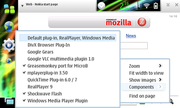
It is shipped with Nokia's N800 and N810 Internet Tablets, and is also available for the 770 via the 'Hacker Editions' of the operating system. In place of Mozilla's XUL-based user interface, MicroB uses the Maemo-native (GTK-based) Hildon API and widgets.

MicroB

History

MicroB was initially released as a public beta for Internet Tablet OS 2007 on July 17, 2007 to allow 3rd party developers and community members to develop and port plugins, and help shape the development of the browser. It was updated several times before it replaced Opera as Internet Tablet OS's default browser with the release of Internet Tablet OS 2008 on November 18, 2007 with the N810.

Architecture

MicroB is Mozilla-based and uses the Gecko engine, but a number of features are omitted due to platform-specific limitations. In particular, SVG support is disabled due to unacceptable performance, and XUL is not included to reduce size and decrease memory consumption. As XUL is not included, most Firefox plugins require porting and repackaging before they can be used with MicroB. In place of XUL, MicroB uses GTK and the Hildon UI toolkit to provide a native interface.

Add-ons

As mentioned above, despite being Mozilla-based, most Firefox extensions cannot be used directly in MicroB (largely due to the lack of XUL support), so porting is usually necessary. The Maemo Browser Extras project is responsible for a large number of the available add-ons.

Some MicroB Plugins

MicroB

* Adobe Flash 9 (bundled with Internet Tablet OS)
* Windows Media Player Stream and Real Player stream supports via the built-in Media player
* Google Gears
* Greasemonkey - All scripts that work on the desktop version of Firefox work fine in MicroB, extending the capabilities of the browser and even replacing the need for some extensions which are not available for MicroB.
* Adblock Plus
* MPlayer plugin
* Flashblock
* wmlbrowser

http://en.wikipedia.org/

Internet Explorer Mobile

Internet Explorer Mobile

Internet Explorer Mobile or IE Mobile (formerly named Pocket Internet Explorer or PIE before Windows Mobile 5.0) is a web browser developed by Microsoft, and comes loaded by default with Windows Mobile and Windows CE for Handheld PC. It does similar operations as Microsoft's Internet Explorer 6 and 7 browsers; however, it is not based on the same layout engine. IE Mobile is available both for Windows Mobile and Windows CE platforms, though the latter is more feature-rich.

Internet Explorer Mobile

Version history

Pocket Internet Explorer was first introduced in Windows CE 1.0, released in November 1996. It does not derive from the Internet Explorer code and was written from scratch for being as light-weight as possible. PIE 1.1 was later released that supported cookies, HTTPS, and SSL. Pocket Internet Explorer 2.0, released in September 1997 with Windows CE 2.0, added many new features: offline browsing, resizing images to fit to screen, and richer HTML support, including framesets and tables. PIE 3.0, introduced in July 1998 with Windows CE 2.10, added support for JScript and various secure protocols.

Internet Explorer Mobile

The next version, Pocket Internet Explorer 4, was the first to support ActiveX, CSS, VBScript as well as further extending support for HTTPS and advanced HTML features. Pocket PC 2002 version of PIE brought limited support for DHTML and XML, and also the ability to browse WAP sites – a feature not present in Internet Explorer for PC, Internet Explorer 6.0 added support for IFrames. The browser supports FTP, XSLT, cookies, animated GIFs among other features.

On July 8, 2008 at the annual Microsoft Worldwide Partner Conference, Microsoft announced Internet Explorer Mobile 6 for their next version of Windows Mobile. Andy Lees, Microsoft's senior vice president of mobile communications business said that Internet Explorer Mobile 6 was going to be a full version of Internet Explorer 6 on Windows Mobile It was shown running briefly during Microsoft's 2009 CES Keynote on a Palm Treo Pro, and again in an official video for Toshiba's TG01 phone, which has Qualcomm's Snapdragon processor.

Internet Explorer Mobile 6 was released as part of Windows Mobile 6.5. New features include enhanced script and AJAX support (Jscript v5.7 from Internet Explorer 8) and support for Adobe Flash Lite 3.1. The browser also has a redesigned Graphical user interface.

Extensions

As with the desktop version, Pocket Internet Explorer's underlying rendering technology is exposed to program developers. This has led to various web browsers built on Pocket Internet Explorer that add additional functionality. Browsers that add "tabbed" browsing include Webby Mobile and ftxPBrowser.

http://en.wikipedia.org/

Bolt browser

Bolt browser

The BOLT Browser is a web browser for mobile phones including feature phones and smartphones that can run Java ME applications. The BOLT Browser is offered free of charge to consumers and is produced by Bitstream Inc., the company that also produces the ThunderHawk (web browser) for Mobile network operators and handset manufacturers.

Bolt browser

BOLT was originally introduced into private beta on January 15, 2009 and was made available to the public on February 16, 2009 when the public beta was announced at Mobile World Congress in Barcelona. Today, BOLT can be installed on Java-based handsets with Java MIDP 2 and CLDC 1.0 or higher support. BOLT also has a specially optimized version for BlackBerry smartphones and works with Windows Mobile and Palm OS devices that employ a MIDlet manager or Java emulator. BOLT was built using the WebKit rendering engine to display a full Web page layout as found on desktop Web browsers such as Opera or Safari.

Features

Introduced in Public Beta

Version 0.86

* Fast, secure, desktop-style web browsing on both high-end and low-end handsets
* Streaming video capabilities to websites such as YouTube, vids.myspace.com, video.yahoo.com, blip.tv, dailymotion.com, and metacafe.com
* Support for XML, ATOM and RDF formats of RSS feeds
* Split screen and full screen modes for easy navigation and viewing
* Easily add and select favorites and view browsing history
* Intuitive keystroke shortcuts for easier navigation and content selection
* 128-bit Secure Sockets Layer (SSL) encryption for secure access to web pages
* Server filtering to protect users from spyware and other malware
* Certificate error notification
* Ability to clear history and cookies
* Support for JavaScript and AJAX

Introduced in Beta2

Version 0.94

* Significantly improved BlackBerry scrolling speed and control
* A new 3XL (extra large) magnification mode with content 33.3 percent bigger than in 2XL
* Double tap approach to select links on touchscreen devices like the BlackBerry Storm (eliminates inadvertent clicks)
* Wi-Fi auto-selection as default option when Wi-Fi is both enabled and available
* Save and view pages locally on the phone
* Support for folders in favorites
* A new landscape viewing feature
* Improved magnifier dragging in split screen mode on the BlackBerry Storm

Introduced in Beta3

Version 1.04

* Copy and paste text
* Enter and edit text directly within online text boxes
* Upload files such as videos to YouTube or pictures to Photobucket
* Order favorites and arrange them into custom folders
* Toggle between viewing websites with or without images displayed
* Support for Cyrillic alphabets
* Addition of RuTube to supported video websites

BlackBerry Specific Features

Features available on the BlackBerry version of BOLT

* Press the Space key to insert a period (.) in the URL address bar
* Press the Escape key to move back to the previous Web page
* On a Web page, press the Space key and the Shift key to move up a screen (feature not applicable for BlackBerry 8100, 8200, and 7100 series devices)
* On a Web page, press the Space key to move down a screen (feature not applicable for BlackBerry 8100, 8200, and 7100 series devices)
* Press T to move to the top of a Web page (feature not applicable for BlackBerry 8100, 8200, and 7100 series devices)
* Press B to move to the bottom of a Web page (feature not applicable for BlackBerry 8100, 8200, and 7100 series devices).

History

* January 15, 2009: BOLT was introduced as a private beta.
* February 16, 2009: BOLT was made available via free public beta at Mobile World Congress.
* April 1, 2009 – BOLT Beta2 was released at CTIA Wireless 2009 in Las Vegas, NV. This release included improvements, fixes to minor bugs and new features.
* June 29, 2009 – BOLT Beta3 released, BOLT lite announced. Beta3 included major improvements, fixes to minor bugs and new features.

http://en.wikipedia.org/

Mobile browser

Mobile browser

A mobile browser, also called a microbrowser, minibrowser or wireless internet browser (WIB), is a web browser designed for use on a mobile device such as a mobile phone or PDA. Mobile browsers are optimized so as to display Web content most effectively for small screens on portable devices. Mobile browser software must be small and efficient to accommodate the low memory capacity and low-bandwidth of wireless handheld devices. Typically they were stripped-down web browsers, but as of 2006 some mobile browsers can handle more recent technologies like CSS 2.1, JavaScript and Ajax. Websites designed for access from these browsers are referred to as wireless portals.

Underlying technology

The mobile browser usually connects via a cellular network, or increasingly via Wireless LAN, using standard HTTP over TCP/IP and displays web pages written in HTML, XHTML Mobile Profile (WAP 2.0), or WML (which evolved from HDML). WML and HDML are stripped-down formats suitable for transmission across limited bandwidth, and wireless data connection called WAP. In Japan, DoCoMo defined the i-mode service based on i-mode HTML, which is an extension of Compact HTML (C-HTML), a simple subset of HTML.

WAP 2.0 specifies XHTML Mobile Profile plus WAP CSS, subsets of the W3C's standard XHTML and CSS with minor mobile extensions.

Newer microbrowsers are full-featured Web browsers capable of HTML, CSS, ECMAScript, as well as mobile technologies such as WML, i-mode HTML, or cHTML.

Pioneers

The first true mobile browser for a PDA was NetHopper for the Apple Newton, released in August 1996.

The so-called microbrowser technologies such as WAP, NTTDocomo's i-mode platform and Openwave's HDML platform have fueled the first wave of interest in wireless data services.

The first deployment of a microbrowser was probably in 1997 when Unwired Planet (later to become Openwave) put their "UP.Browser" on AT&T handsets to give users access to HDML content.

A British company, STNC Ltd., developed a microbrowser (HitchHiker) intended to present the entire device UI in 1997. The demonstration platform for this microbrowser (Webwalker) had 1 MIPS total processing power. This was a single core platform, running the GSM stack on the same processor as the application stack. In 1999 STNC was acquired by Microsoft and HitchHiker became Microsoft Mobile Explorer 2.0, not related to the primitive Microsoft Mobile Explorer 1.0. HitchHiker is believed to be the first microbrowser with a unified rendering model, handling HTML and WAP along with ECMAScript, WMLScript, POP3 and IMAP mail in a single client. Although it was not used, it was possible to combine HTML and WAP in the same pages although this would render the pages invalid for any other device. Mobile Explorer 2.0 was available on the Benefon Q, Sony CMD-Z5, CMD-J5, CMD-MZ5, CMD-J6, CMD-Z7, CMD-J7 and CMD-J70. With the addition of a messaging kernel and a driver model, this was powerful enough to be the operating system for certain embedded devices. One such device was the Amstrad e-m@iler and e-m@iler 2. This code formed the basis for MME3.

Released in 2001, Mobile Explorer 3.0 added iMode compatibility (cHTML) plus numerous proprietary schemes. By imaginatively combining these proprietary schemes with WAP protocols, MME3.0 implemented OTA database synchronisation, push email, push information clients (not unlike a 'Today Screen') and PIM functionality. The cancelled Sony Ericsson CMD-Z700 was to feature heavy integration with MME3.0. Although Mobile Explorer was ahead of its time in the mobile phone space, development was stopped in 2002.

A freeware (although later shareware) browser for the PalmOS was Palmscape, written in 1998 by Kazuho Oku in Japan, who went on to found Ilinx. Still in limited use as late as 2003.

Also in 2002, Palm, Inc. offered Web Pro on Tungsten PDAs based upon a Novarra browser.

Opera Software pioneered with its Small Screen Rendering (SSR) and Medium Screen Rendering (MSR) technology. The Opera web browser is able to relayout regular web pages for optimal fit on small screens and medium-sized (PDA) screens. It was also the first widely available mobile browser to support Ajax and the first mobile browser to pass ACID2 test.

http://en.wikipedia.org/